
Orbital Bot
Orbital Bot is a single Discord bot that replaces every Orbital sub-bot. One invite, one identity, modular features you can enable per server.
It is the Discord side of Orbital, the app side lives at app.orbitalhq.xyz.
Modules
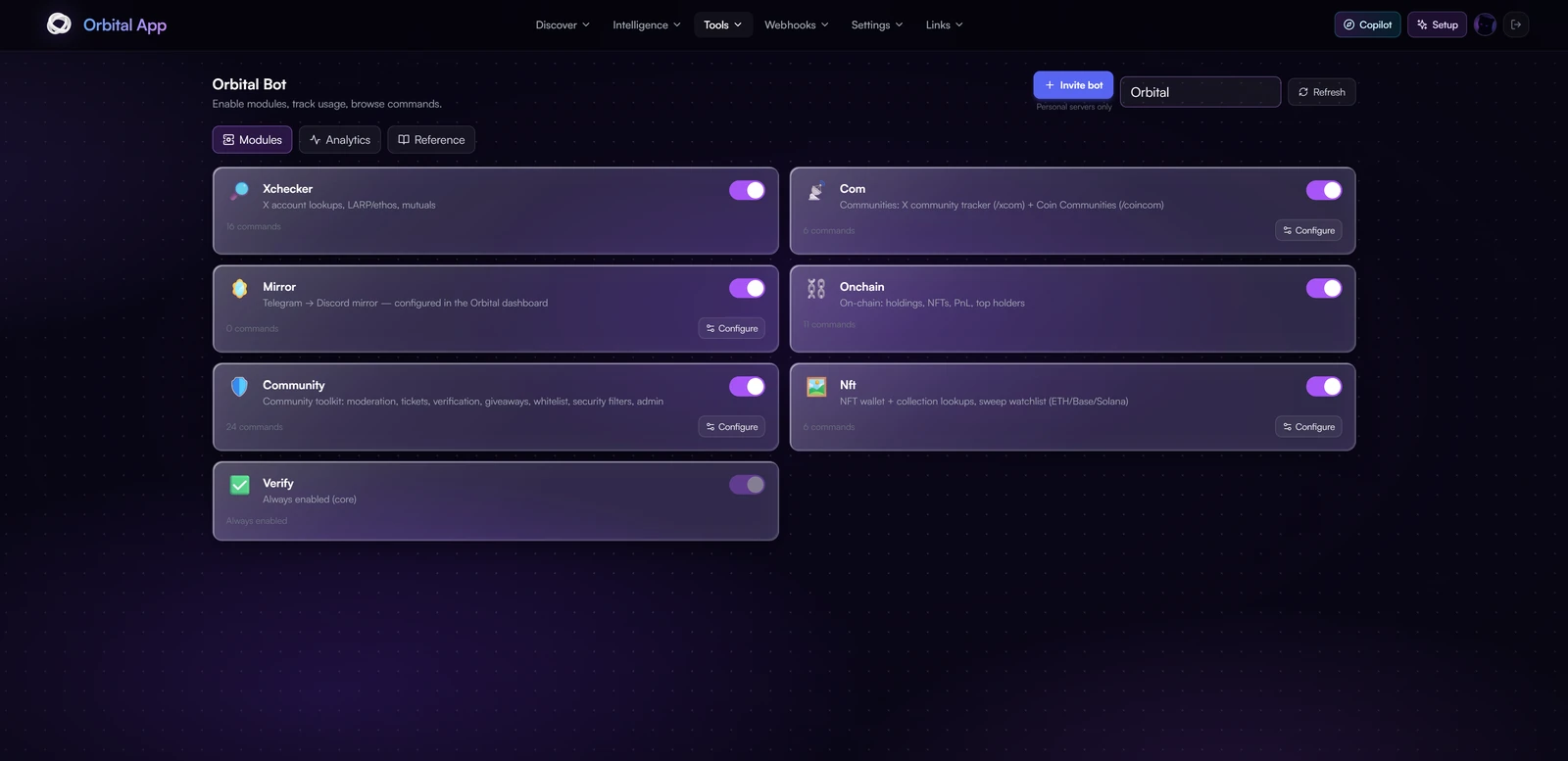
Each module can be toggled on or off per guild from the Orbital app (Bot → Modules). A module is a bundle of slash commands, listeners, and background workers.
| Module | What it provides |
|---|---|
| xchecker | /xchecker userinfo, /xchecker firstfollowers, /xchecker alphareport, /xchecker searchonx, and all other X-Checker commands. |
| onchain | Multi-chain analytics across Solana, Ethereum, Base and Robinhood Chain: /onchain token, /onchain chart, /onchain safety, /onchain deployer, /onchain topholders, /onchain bubblemap, /onchain commonholders, /onchain earlybuyers, /onchain holdings, /onchain nfts, /onchain wallet, /onchain pnl, /onchain multiholdings, /onchain convert. |
| pnl | /pnl card renders a shareable PnL card for a Solana wallet. Custom image or video backgrounds, three card shapes, and a frost option (auto, light, heavy) that keeps the stats readable over bright artwork. Also available on Telegram. |
| xfollows | Your personal X follow feed in your own server: /xfollows add, /xfollows list, /xfollows remove, /xfollows webhook-create, /xfollows webhook, /xfollows webhook-clear, /xfollows pause, /xfollows status, /xfollows test. See X Follows below. |
| xcom | /xcom track, /xcom untrack, /xcom list, /xcom communities, /xcom members. Subscribe your server to X community alerts and receive them via webhook. |
| mirror | Telegram → Discord mirror. Configured entirely from the app (no slash commands); forwards messages through dedicated webhooks with automatic validation. |
| community | Moderation, tickets, giveaways, verification, whitelist (per-guild admin tools). Fully admin-gated. |
| security | Public top-level commands /security scanurl (URL reputation scan) and /security test (dry-run the filter). Admin filter configuration lives in the app. |
X Follows: your personal follow feed
Track the X accounts you care about and get their new follows posted in your own server, in the same format as Orbital's ✖️・follows feed. Your list is shared with the Telegram "My X Follows" feed and the app.
| Command | What it does |
|---|---|
/xfollows add | Track up to 10 X handles at once (space or comma separated, @name or x.com links). |
/xfollows list | Show the accounts on your feed. |
/xfollows remove | Stop tracking an account. |
/xfollows webhook-create | New. Pick a channel and the Orbital Bot creates the feed's webhook there for you. Posts then carry the ➕ Follow / Unfollow button. Needs the bot's Manage Webhooks permission in that channel. |
/xfollows webhook | Paste a webhook you created yourself (private form). Works without any extra permission, but posts come without the Follow / Unfollow button. |
/xfollows webhook-clear | Stop posting to Discord. |
/xfollows pause | Pause or resume posting. |
/xfollows status | Your feed's webhook and list. |
/xfollows test | Post a real recent follow to your channel, marked [TEST]. |
Why two webhook options? Discord only allows interactive buttons on webhooks created by the bot itself. With /xfollows webhook-create, clicking ➕ Follow / Unfollow on a post opens a private reply, visible only to the person who clicked, to follow or unfollow that account with their own X account. See Follow & Unfollow from anywhere.
Missing the permission? If the bot joined your server before the permission was added to the invite, grant it once: Server Settings → Roles → Orbital → Manage Webhooks (or only on the channel you want). Opening the invite link again from the app also updates it, without removing the bot or resetting anything.
Access tiers
Commands fall into one of three tiers:
- Open (no subscription required), none today; everything below is gated.
- Subscriber:
/xchecker …,/onchain …,/xcom …,/security …. Unlocked by: - The Users or NFT Holder role in the Orbital guild, or
- The ORB member role in the ORB guild, or
- A verified wallet with NFTs, or a whitelist entry.
- Admin: every
/community …subcommand except the public security ones. Requires Manage Server permission in the guild where the command is invoked, on top of subscriber access.
Setup in a new server
Any subscriber (Users or NFT Holder) can bring Orbital to a private server they admin.
- Open app.orbitalhq.xyz → Dashboard → Bot → Invite bot and pick your server.
- Back in the Bot panel, select your guild from the dropdown, you'll only see servers where you're an admin and Orbital is present.
- Toggle on the modules you want. Commands sync to Discord within ~30 seconds.
The invite includes Manage Webhooks, used only when an admin asks the bot to create a feed webhook (
/xfollows webhook-create). - Configure per-module settings from the app:
- Mirror → setup wizard + webhook
- X-Com → subscribe to tracked X handles + set alert webhook
- Community → Tickets, Infractions, Whitelist, Security filters, Setup wizards
What it replaced
A single Orbital Bot now covers features that previously required separate bots. Legacy bots (X Community Tracker, Orbital Whitelist, Link Filter, Orbital Mirror, Orbital Alpha, Orbital Following Manager slash commands, Orbital On-chain wallet bot, X-Checker Discord bot) were retired during the consolidation.
DMs sent by Feeds, Following Manager, and X-Com alerts now all go through Orbital Bot's HTTP relay, so users only ever see one Orbital identity.