
pump.fun Callouts
A callout is pump.fun's call-your-entry feature. A caller posts a thesis on a coin at a given market cap, and pump.fun tracks the multiple from that entry onwards. It is a public, timestamped call, which makes it one of the cleanest signals on the platform: you can see who called it, what they said, and where they called it.
Orbital tracks those callouts and delivers them to you as they land, usually less than a minute after the caller posts.
Two feeds, one command
You pick which stream you want with /callouts mode.
| Feed | What arrives |
|---|---|
| Global | Every callout from pump.fun's verified (gold tick) callers. Nothing to set up. |
| Custom | Only the callers you picked, verified or not. |
Global is the "show me what the known names are calling" feed. The roster builds itself from the platform, so there is no list for you to maintain and no caller to miss when a new one earns the tick.
Custom is the one to use when you already know whose calls you care about. It is deliberately not limited to verified callers: plenty of the sharpest accounts do not carry the gold tick, and a custom list is yours to define.
Two destinations
Callouts can go to either or both:
- Discord, into your own server, through a webhook you provide with
/callouts webhook. - Telegram, straight to your DMs from @orbitalfeedsbot.
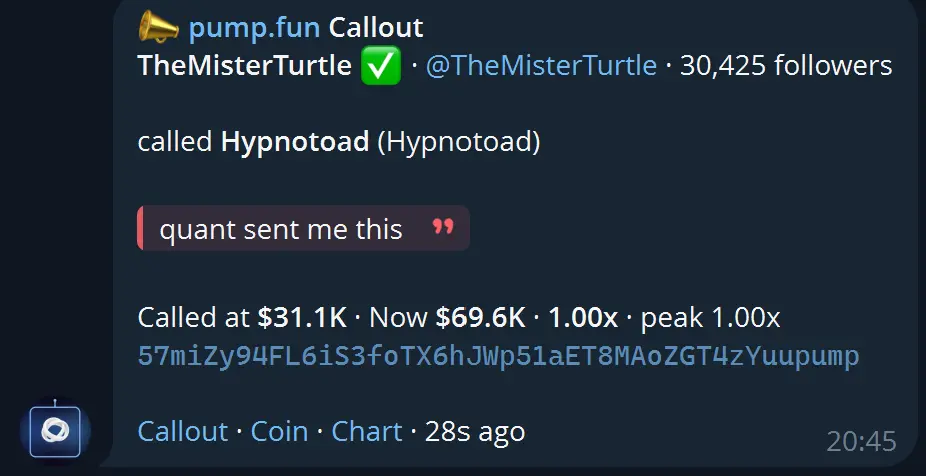
Telegram will not let a bot message you first, so open the bot and press Start before turning that route on. If Telegram refuses delivery, the route switches itself off rather than failing quietly, and you can turn it back on once the chat is open.
What a callout looks like
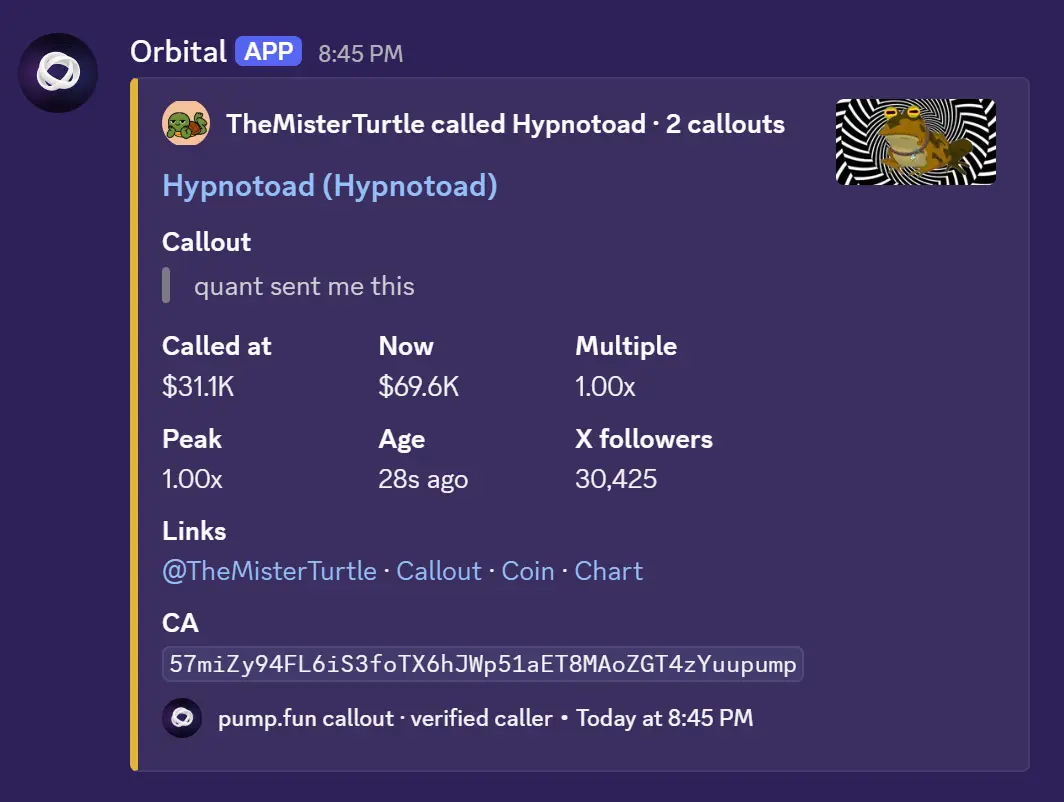
Every delivery carries the same information in both places:
- The caller: name, verification, X handle and follower count.
- The coin they called, with its artwork.
- Their callout message, quoted, which is the whole point of the alert.
- Called at market cap, the current market cap, the multiple and the peak.
- Age, so you can see at a glance how fresh the call is.
- The contract address, ready to copy, plus links to the callout, the coin, and its chart.
Chart links resolve to the coin's actual DexScreener pair rather than a search page, so the link opens on a chart.
Building a custom list
Add callers with /callouts add. Any of these work:
- an X handle, such as
@slingoorio - their pump.fun name, such as
unipcs - their wallet address, pasted straight in
- a pump.fun profile URL
Autocomplete suggests callers Orbital has already seen, and picking one of those guarantees it resolves. If you add a caller who has not appeared yet, the entry is kept and marked as waiting: it starts firing the first time that caller shows up. If it never fires, check the spelling.
Remove callers with /callouts remove, which accepts the same name you added.
You can track up to 50 callers on a custom list.
Commands
Run these in Discord, in a server where the Orbital bot is set up for you.
| Command | What it does |
|---|---|
/callouts status | Your current setup: feed, destinations, callers |
/callouts mode | Switch between the Global and Custom feed |
/callouts webhook | Set the Discord webhook your callouts post to, through a private form |
/callouts webhook-clear | Stop posting to your Discord webhook |
/callouts telegram | Turn Telegram DMs on or off, with a link to open the bot |
/callouts add | Add one or more callers to your custom list |
/callouts remove | Remove a caller from your custom list |
/callouts min-followers | Only alert when the caller has at least N X followers |
/callouts pause | Pause or resume delivery |
/callouts test | Send yourself a real, current callout marked as a test |
The same feed is managed from Telegram with /callouts in @orbitalfeedsbot, where you can switch feed, toggle DMs, add and remove callers, and send yourself a test.
Good to know
- Fresh calls only. Only recent callouts are delivered, so turning the feed on never dumps a backlog into your channel.
- Adding a caller does not replay their history. You get what they call from that point onwards.
- Pausing does not queue anything up. Resuming starts from that moment.
- Your webhook URL is never shown back to you. It is a credential for that channel, so Orbital stores it and confirms only that one is set. If a webhook is deleted, Orbital clears it automatically instead of retrying against a dead channel.
- A verified caller and a tracked caller are shown differently, so a caller you added yourself is never dressed up as gold-tick verified.
How to access
The callouts feed is part of the Orbital bot and requires an active subscription or NFT holder access. The /callouts commands run in your own server, alongside the rest of the personal Orbital tools. For Telegram delivery, link your account once with /sync in @orbitalfeedsbot.