
Orbital Feeds on Telegram
Orbital delivers signals on Telegram two ways: a broadcast channel that every subscriber receives, and a personal bot (@orbitalfeedsbot) that lets you build and manage your own feeds from inside chat, no website required.
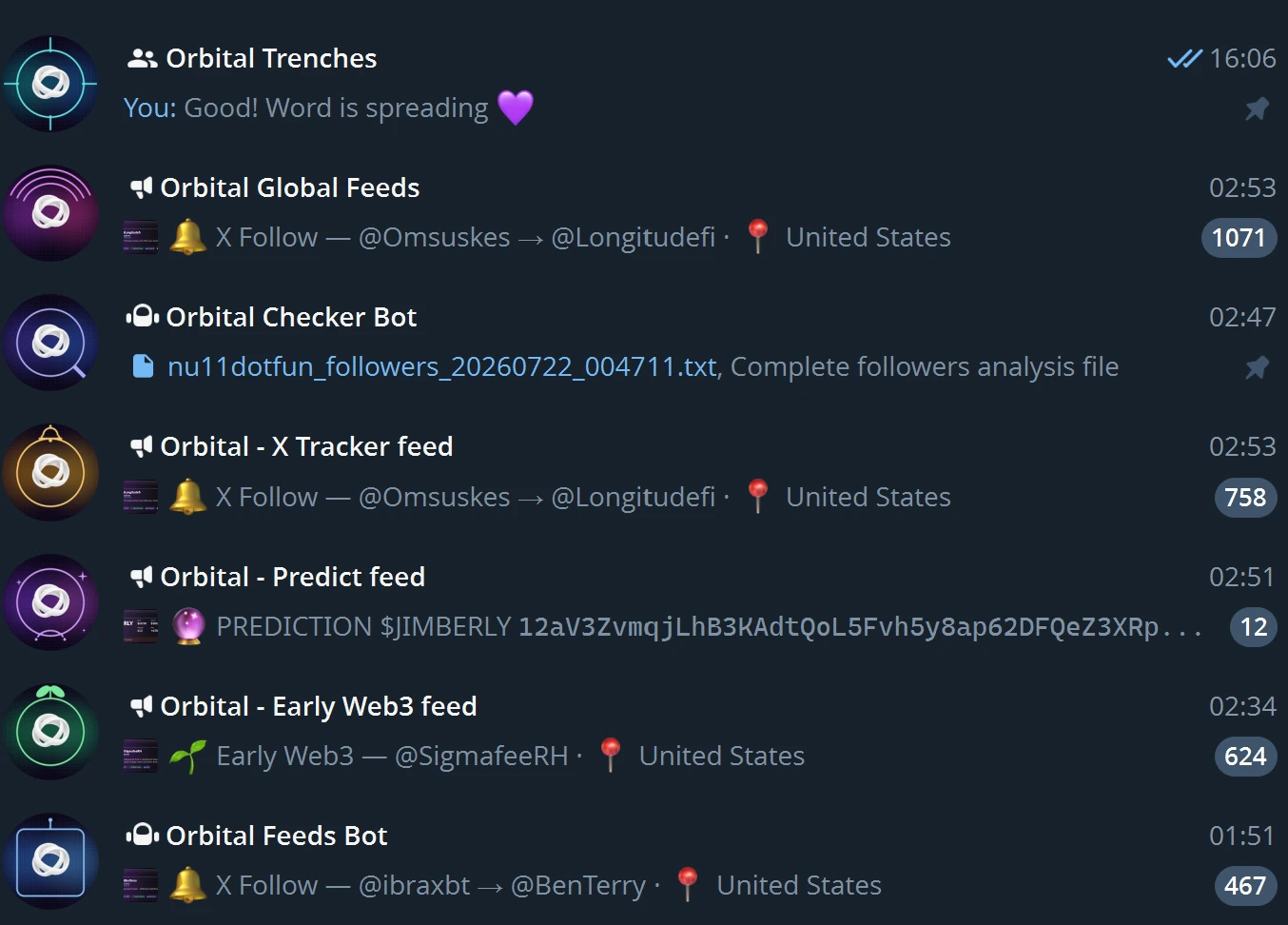
The Orbital Feeds channel
Orbital Feeds is a private Telegram channel where every high-signal event from the Orbital pipeline is auto-published as a clean visual card. Available for all active subscribers: no extra setup, no role gating beyond your standard Orbital subscription.
What lands in the channel
- X Follow: new follows from the 100+ tracked KOL accounts (Follows feed)
- Early Web3: newly discovered Web3 projects (Early Caught Web3 feed)
- Multi-X hits: when a tracked token crosses 2x / 5x / 10x / 50x / 100x milestones
- Predictions: Critical / High / Medium / Low confidence signals from the Predict engine, with live heat score
- Cooled: when a previously hot signal weakens
- Holder Double: holders 2× in under 30 minutes
- KOL Buy: real-time KOL wallet swaps detected via Helius WebSocket
- Momentum: volume + price spike alerts
How to join
- Verify you have an active Orbital subscription
- Join our private Telegram group: t.me/orbitaltrenches
- Request access to the Orbital Feeds channel inside that group
- You'll receive a one-use invite link to the private Telegram channel
- Cards start arriving automatically, no commands, no setup
What makes it different
- Image-based cards: every event is a custom-rendered glass card with the project's avatar, key metrics, and contract address. Reads at a glance on mobile.
- CA in monospace: tap-to-copy the contract address straight from the caption.
- Channel access protected: content saving and forwarding are restricted at the Telegram level so signals don't leak beyond paying subscribers.
- Follow / Unfollow buttons: every X Follow and Early Web3 post has them. Tap to follow or unfollow that account with your own X account, without leaving Telegram (needs your X cookies connected and your Telegram linked). See Follow & Unfollow from anywhere.
- Same alpha as Discord: the Telegram channel mirrors the high-signal Discord alerts; choose whichever surface you prefer (or both).
Note: the channel is broadcast-only: replies and member chat are disabled. For discussion, use the Orbital Discord.
Your personal feeds bot: @orbitalfeedsbot
The broadcast channel is the same for everyone. @orbitalfeedsbot is your private control panel: DM the bot to pick which global feeds you get, follow your own list of X accounts, and build Pulse webhooks that scrape your own X timeline. Everything below runs in a direct message with the bot.
First, link your account
- Open a DM with @orbitalfeedsbot and press Start.
- Run
/syncto link your Discord account. Your Orbital subscription (active membership or NFT role) is checked on every action, so linking is required before any personal feed will work. - Run
/feedsto open the menu.
Every mutating action is gated behind your verified subscription. The bot always acts on your own linked account, never on an id you type in.
Global vs Personal feeds
/feeds (alias /subscribe) opens a two-level menu:
- Global Feeds shared Orbital signals, identical for everyone. Toggle X Follow, Early Web3, and Predict on or off for your DMs. Use all on / all off to flip them together.
- Personal Feeds your own signals:
- My X Follows DMs you when an account you added (or a curated KEY profile you favorited) makes a new follow.
- 𝕏 Manage Pulse webhooks jumps to your Pulse control panel (same as
/pulse).
My X Follows: add and remove accounts
Build your own follow-tracking list without leaving Telegram.
- Add run
/addxfollow @handle, or tap Add account to X Follows under Personal Feeds and send the handle. Adding is idempotent; if the account is already tracked globally it is attached to your list instantly. - View / remove run
/myxfollowsor tap My X Follows list. The list shows both accounts you added and curated KEY profiles you favorited, with a running count of each. Tap **** on any row to remove it.
Make sure My X Follows is toggled on in /feeds → Personal to actually receive the DMs.
Pulse webhooks: create, manage, delete
Pulse watches your own X timeline and DMs you (and optionally posts to a Discord channel) when tracked accounts post. Run /pulse (alias /webhooks) to open the Pulse screen, which lists every webhook you own plus a New Pulse webhook button.
Create a webhook
- Tap New Pulse webhook.
- Send a name for it (for example
CT calls). - Paste a Discord webhook URL to also fan out to a Discord channel, or send
skipfor a Telegram-only webhook. - The bot opens the account manager for the new webhook so you can start adding accounts right away.
Manage its accounts
- Each webhook row has a Accounts button. Open it to see every tracked account, each with a **** to remove it, plus Add account to arm capture and send the next handle.
- Removing an account drops it from that webhook only; it does not untrack the account everywhere else.
- A webhook with no accounts tracks all of your tracked accounts.
Telegram delivery toggle
- Every webhook row has a to Telegram toggle. Turn it on to receive that webhook's posts as DMs from the bot; leave it off to send only to its Discord channel.
Delete a webhook
- Open the webhook's manage view and tap Delete webhook, then confirm on the next screen. Deletion is scoped to your account only.
Connect your X cookies (optional, not needed for Pulse)
Pulse does not need this. Your feeds run on Orbital's own infrastructure, so Pulse keeps delivering whether or not you ever connect an X account, and it cannot go silent because your personal login expired.
Connecting cookies is needed for the Following Manager in the app, which scans your own followings, and for the Follow / Unfollow buttons, which act with your own account. If you do want that:
- Run
/cookies. The/pulsescreen shows whether any are on file. - Install the free Cookie-Editor browser extension and open x.com while logged in.
- In Cookie-Editor choose Export → Export as JSON, copy everything, and paste it back into the bot.
- The bot validates that
auth_tokenandct0are present, stores the cookies encrypted, confirms the detected @username, and immediately deletes your pasted message so the cookies are never left in chat history.
Your cookies stay on Orbital's server, encrypted, and are used to read your own following list for the Following Manager. Setting cookies requires the Users role; NFT-only holders may need to upgrade, and the bot relays any access error.
Post formats
Pulse DMs are tuned to read cleanly on mobile:
- Text posts slim avatar header strip plus a compact caption.
- Image posts a single composite card: details on the left, image on the right.
- Video posts a playable video with the full header caption.
- Every caption uses tap-to-copy contract addresses, clickable links, and a
View Postfooter with the UTC timestamp. Forwarding is protected.
pump.fun callouts
/callouts opens your pump.fun callout feed inside the bot. Choose the Global feed (every
verified gold-tick caller) or a Custom list of callers you pick yourself, verified or not,
then have them DM'd to you here, sent to your own Discord webhook, or both.
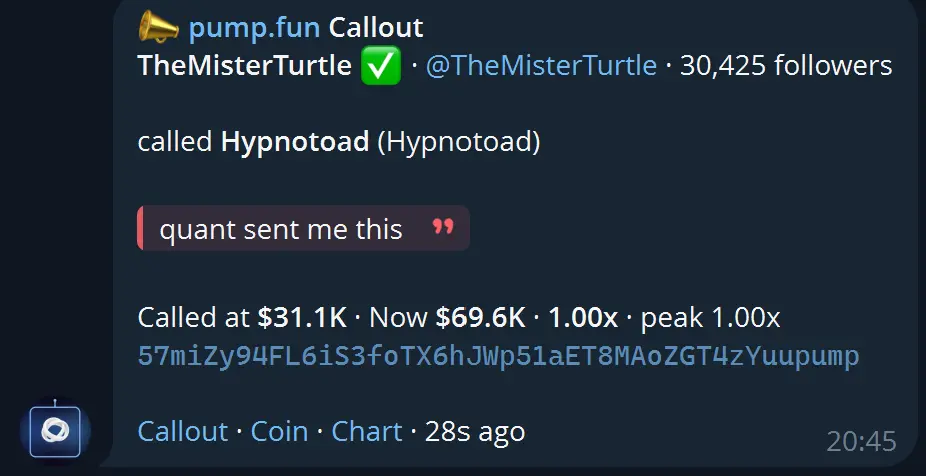
From the same screen you can add and remove callers by X handle, pump.fun name or wallet, set a follower filter, pause delivery, and send yourself a real sample call to check it works. Full detail on the pump.fun Callouts page.
Telegram does not let a bot open a conversation, so press Start in the bot before turning DM delivery on. If Telegram refuses us, the route switches itself off rather than failing silently.
Command reference
| Command | What it does |
|---|---|
/feeds (/subscribe) | Manage your feeds (Global + Personal) |
/addxfollow @handle | Add an X account to your My X Follows feed |
/myxfollows | View / remove the X accounts you added |
/pulse (/webhooks) | Create / manage Pulse webhooks and their accounts |
/callouts | Your pump.fun callout feed: Global or Custom, DMs or webhook |
/cookies | Connect your X cookies (optional, Following Manager only) |
/status | Show what you're subscribed to |
/sync | Link your Discord account |
/unsubscribe | Turn off all feeds |
/help | Show all commands |