Dashboard
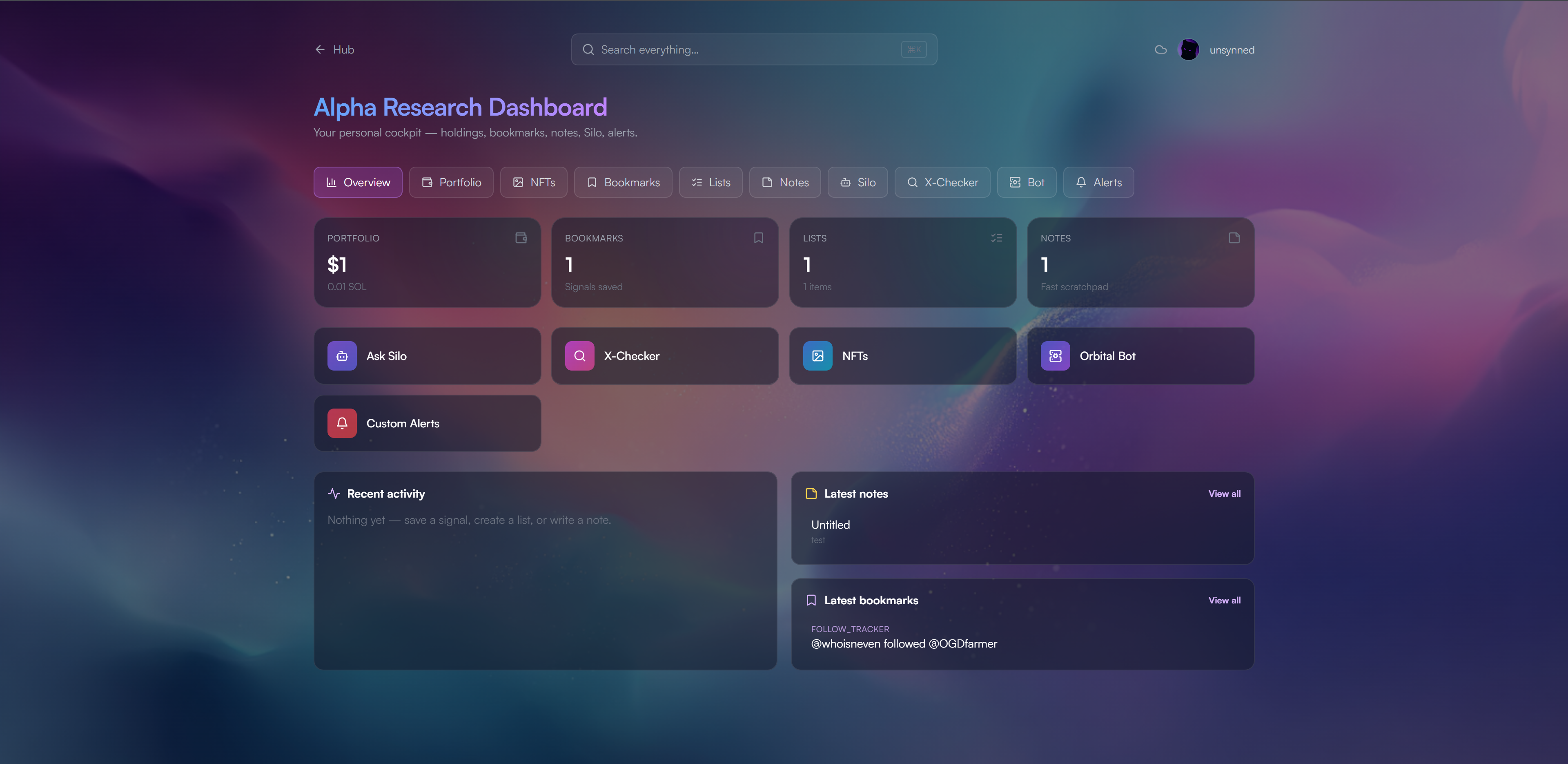
The Orbital Dashboard at app.orbitalhq.xyz/dashboard is your personal research cockpit. One login (wallet or Discord) gets you the full set of panels:
- Overview: stats and activity feed
- Portfolio: SPL tokens + SOL balance with live DexScreener prices
- NFTs: your Orbital NFT holdings (fetched via Helius)
- Bookmarks / Lists / Notes: save and organise signals from Feeds, with backend cloud sync
- Silo chat: ask Silo anything without leaving the dashboard
- X-Checker: run every X-Checker command in a chat-style runner
- Bot: control Orbital Bot in servers you admin (modules, Mirror, X-Com, Community, analytics)
- Alerts: notification preferences (Discord DMs + webhooks)
Access is open to any Orbital subscriber (Users or NFT Holder). The Bot panel shows only the servers where you can actually manage Orbital, module configuration is enforced automatically.
Bot
Modules tab: toggle modules on/off per guild. Shows live module state, command counts, and a per-module “Configure” button.
Analytics tab: command usage graphs, per-guild stats, per-module breakdowns.
Reference tab: searchable command reference sourced directly from the bot.
Per-module panels (from the “Configure” button)
Mirror: 4-step setup wizard (Telegram credentials → login code → source + target → filters + webhook). Manage slots: pause, resume, edit, delete. Webhook URLs are validated against the guild before saving.
X-Com: subscribe the guild to X handles from the shared tracking pool (or add new ones), configure the alert webhook, control leave-detection alerts, view poller status. Export subscriptions.
Community: five tabs:
- Tickets: full ticket queue with view / resolve / close / reopen / delete actions
- Infractions: per-user history + bulk clear
- Whitelist: mint/allowlist submission panel (required role, post panel, view submissions, CSV/TXT export)
- Security: filter toggles, log channel, exempt roles, channel allow-lists for contracts and links
- Stats + Setup: one-click moderation setup (Muted role + mod-logs channel) and verification setup (role + method + panel channel)
X-Checker: chat-style command runner + Link Telegram widget. Users who want the Telegram version run /sync in the TG bot and paste the code here to link their Discord identity.
Feeds
Feeds (the smart-signals dashboard) is mounted at /curated inside the same app, see Feeds.
Following Manager
Following Manager (follow-tracker SPA) is mounted at /following, see Following Manager.
Authentication
Wallet login (Phantom / Solflare / OKX) with an Orbital NFT, or Discord OAuth with an active membership/role. The Users or NFT Holder role (or a verified wallet) is required to reach the dashboard.
From the Bot panel, you only see the servers you can actually manage. Orbital enforces this automatically on every module action. Invite Orbital to your own private server to start configuring it.